

What Is Meta Ads Manager?
Meta Ads Manager is the central dashboard where advertisers create, manage, and analyze their paid campaigns across Facebook, Instagram, Messenger, and the Audience Network. When you set up your first Meta ad campaign, this is your command center. It gives you granular control over targeting, budgets, creatives, and performance metrics all in one place.
At 20clicks, we believe understanding the platform architecture first saves you time and money. Meta Ads Manager is separate from your personal Facebook profile; it is a professional tool accessed through Meta Business Suite or directly at ads.facebook.com.
Setting Up Meta Business Suite
Before you can set up your first Meta ad campaign, you need a Meta Business Suite account. Here is how to get started:
Step 1 -Create a Facebook Page
Every Meta ad account must be linked to a Facebook Business Page. If you do not have one, go to facebook.com/pages/create and fill in your business details. This page acts as the identity of your brand in all ad campaigns.
Step 2 -Open Meta Business Suite
Visit business.facebook.com and sign in with your Facebook account. Click ‘Create Account,’ enter your business name, your name, and your work email. Meta Business Suite is the unified hub for managing pages, ad accounts, and assets.
Step 3 -Add Your Ad Account
Inside Business Suite, navigate to Business Settings > Accounts > Ad Accounts. Click ‘Add’ and either create a new ad account or claim an existing one. Give your account a clear name related to your brand.
Step 4 -Set Up Payment
Go to Billing and add a valid payment method a credit card, debit card, or PayPal account. Meta will charge you based on your campaign delivery, so ensure the payment information is accurate before you go live.
How to Create Your First Facebook Ad Campaign
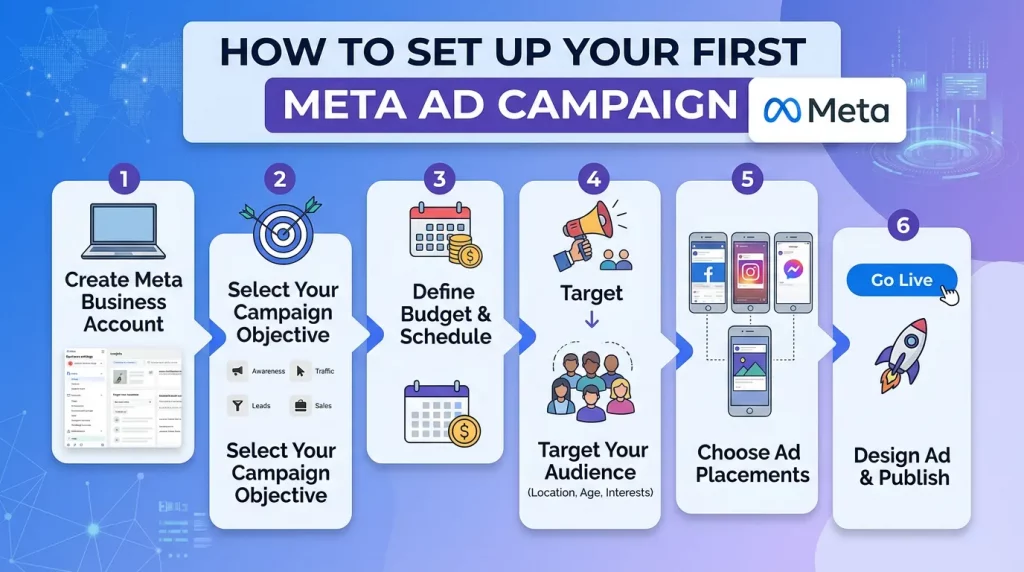
Now that your account is ready, it is time to learn how to create your first Facebook ad campaign. The process follows Meta’s three-tier structure: Campaign → Ad Set → Ad. Here is the step-by-step walkthrough that 20clicks recommends for beginners:
Step 1- Choose a Campaign Objective
Click the green ‘+ Create’ button in Ads Manager. Meta will ask you to choose an objective. The six main objectives are: Awareness, Traffic, Engagement, Leads, App Promotion, and Sales. For most beginners looking to set up their first Meta ad campaign, Traffic or Engagement is a good starting point. If you are selling a product, choose Sales.
Step 2- Name Your Campaign and Set the Budget
Give your campaign a clear, descriptive name. Enable Advantage Campaign Budget (formerly CBO) if you want Meta’s algorithm to distribute your budget automatically across ad sets. Start with a modest daily budget even $5 to $10 per day gives you meaningful data during your first week.
Step 3- Define Your Ad Set (Audience + Placement)
This is where targeting lives. Choose your target location, age range, gender, and interests. For a first campaign, keep your audience broad (500k–2M potential reach) rather than over-targeting. Under Placements, select ‘Advantage+ Placements’ so Meta automatically shows your ad where it performs best including Facebook Feed, Instagram Stories, and Reels.
Step 4- Create Your Ad
Choose your ad format: Single Image, Carousel, Video, or Collection. Write a compelling primary text(hook your audience in the first line), a clear headline, and a strong call-to-action (CTA) button. Upload your creative high-quality visuals are non-negotiable. At 20clicks, we always test at least two ad creatives per ad set to identify what resonates.
Step 5- Review and Publish
Click ‘Review’ to check everything before publishing. Meta will review your ad (usually within 24 hours)to ensure it complies with their advertising policies. Once approved, your campaign will go live and begin spending your budge
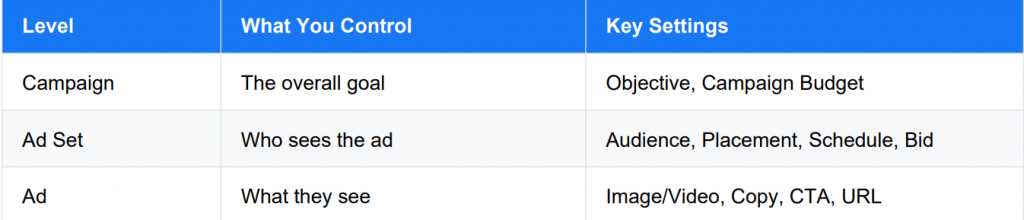
Understanding Campaign Structure
Understanding this structure is essential before you set up your first Meta ad campaign. Think of the Campaign as your goal, the Ad Set as your strategy, and the Ad as your message. Most beginners make the mistake of cramming everything into one ad set instead, create separate ad sets for different audiences to learn what works.
The 3-2-2 Method in Facebook Ads
The 3-2-2 method in Facebook ads is a creative testing framework that helps advertisers
systematically find winning combinations without wasting budget. Here is what it means:
The beauty of the 3-2-2 method in Facebook ads is that it gives you structured, comparable data. After running for 7–14 days with a consistent budget, you can clearly see which audience, creative, and copy angle performs best then scale only the winner. The 20clicks team uses this method as a default starting framework for all new client campaigns because it eliminates guesswork.
Is $1 a Day Enough for Facebook Ads?
This is one of the most common questions from beginners, and the honest answer is: it depends on your goal. Technically, Meta allows a minimum daily budget of $1 for some campaign types. So is $1 a day enough for Facebook ads?
For brand awareness testing: Yes, $1/day can generate impressions and reach in low-cost
markets, giving you early data on how your creative performs.
For lead generation or sales: Likely not. Meta’s algorithm needs at least 50 optimization events
(clicks, leads, or purchases) within a 7-day period to exit the learning phase. At $1/day, reaching that threshold could take months.
For learning and experimentation: A budget of $5–$20/day is far more effective. It gives the
algorithm enough data to optimize quickly and delivers meaningful insights within 1–2 weeks.
The 20clicks recommendation for anyone looking to set up their first Meta ad campaign is to start with a minimum of $10/day per ad set for at least 7 days. This ensures Meta’s delivery system has enough room to optimize and find your best-performing audience segments.
How to Create Ads in Meta Business Suite
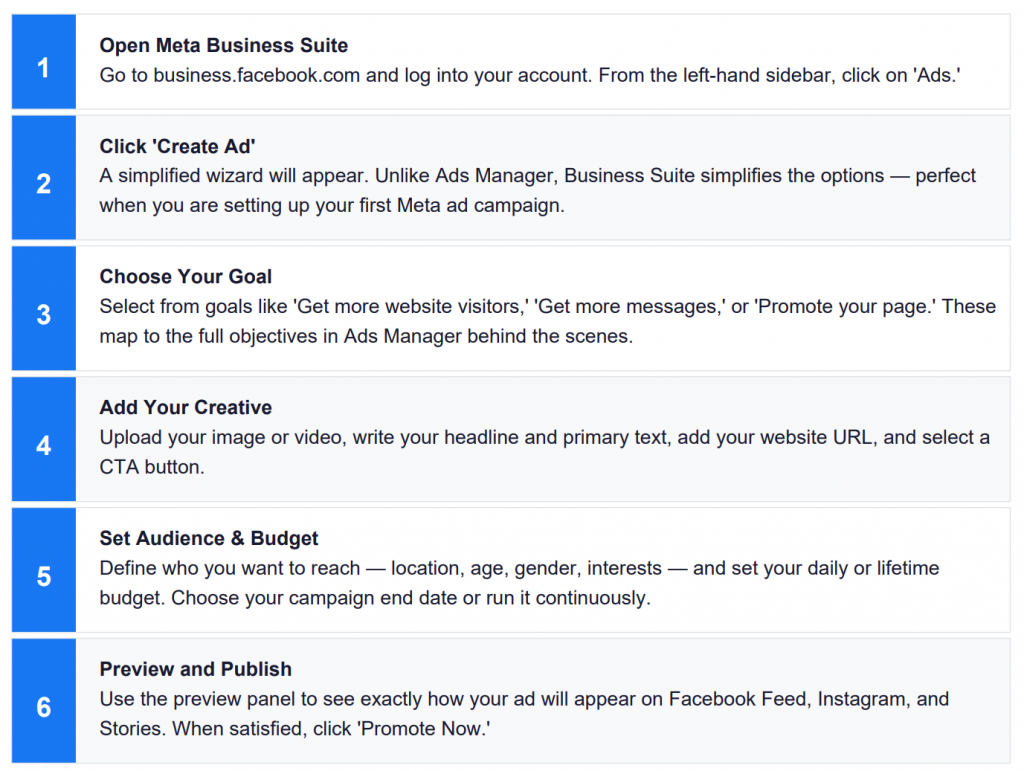
Meta Business Suite offers a simplified ad creation interface ideal for small businesses and beginners. Here is how to create ads in Meta Business Suite step by step:
Best Practices for Your First Meta Ad Campaign
Before you hit publish, here are the top best practices from 20clicks to ensure your first Meta ad campaign gets off to a strong start:
Use the Facebook Pixel
Install the Meta Pixel on your website before running any ads. This small piece of code tracks
conversions, builds custom audiences, and powers retargeting it is the foundation of effective paid social. Start Broad, Then Narrow
Beginners often over-target. Start with a broad audience (1–3M) and let Meta’s algorithm find the right people. Use detailed targeting to narrow down only once you have performance data. Test One Variable at a Time
Whether you use the 3-2-2 method or your own framework, always isolate variables. Testing multiple changes simultaneously makes it impossible to identify what is working. Write for Thumb-Stopping Power
You have about 1.7 seconds to stop a scroll. Your first line of ad copy and your visual must
immediately communicate value. Lead with a bold benefit, a provocative question, or a striking image. Monitor Frequency
If your ad frequency (average number of times one person has seen your ad) climbs above 3–4 within a week, refresh your creative to avoid ad fatigue. Set a Clear KPI
Before you set up your first Meta ad campaign, decide what success looks like. Is it cost-per-click,cost-per-lead, or return on ad spend (ROAS)? Without a clear KPI, you cannot evaluate performance objectively.
Frequently Asked Questions
Q1. How do I create my first Facebook ad campaign from scratch?
To create your first Facebook ad campaign, start by setting up a Meta Business Suite account at business.facebook.com. Link your Facebook Page, add a payment method, and open Ads
Manager. Click ‘+ Create,’ choose your campaign objective (Traffic or Sales for most beginners), define your audience in the Ad Set level, and design your ad with a compelling image or video, headline, and CTA. Once reviewed, click Publish. The whole process takes about 30–60 minutes for first-timers.
Q2. What is the 3-2-2 method in Facebook ads and should beginners use it?
The 3-2-2 method in Facebook ads means testing 3 audiences, 2 creative concepts, and 2 copy variations simultaneously. Yes, beginners should absolutely use it gives your campaign structure and makes results directly comparable. Rather than guessing which approach works, you get real data within 7–14 days that clearly shows your winning combination. 20clicks recommends it as a default starting framework for all new campaigns.
Q3. Is $1 a day enough for Facebook ads to see real results?
$1 a day is technically allowed by Meta, but it is rarely enough to generate meaningful results.
The Meta algorithm needs volume specifically, around 50 conversion events per week to
optimize effectively. At $1/day, you may gather very limited impressions but are unlikely to exit
the learning phase for conversion-focused campaigns. 20clicks recommends a minimum of
$10/day per ad set for at least 7 days to get reliable performance data.
Q4. How do I set up a Meta ad step by step using Meta Business Suite?
To set up a Meta ad step by step in Business Suite: (1) Go to business.facebook.com and click
Ads. (2) Click ‘Create Ad.’ (3) Select your goal. (4) Upload your creative and write your copy. (5)Define your audience location, age, interests. (6) Set your daily budget. (7) Preview your ad across placements. (8) Click ‘Promote Now.’ Business Suite is more beginner-friendly than Ads Manager, making it perfect for first-time advertisers.
Q5. What is the difference between Meta Ads Manager and Meta Business Suite for ad
creation?
Meta Business Suite is a simplified interface designed for small business owners who want
quick, guided ad creation with fewer options. Meta Ads Manager is the advanced platform
offering full control over objectives, bidding strategies, audience segmentation, A/B testing, and
detailed analytics. For your first Meta ad campaign, Business Suite is easier to start with. As you grow more confident especially when applying frameworks like the 3-2-2 method graduate to Ads Manager for greater flexibility and control.
Conclusion
Learning how to set up your first Meta ad campaign does not have to be overwhelming. With the right framework understanding Meta Business Suite, following a clear step-by-step process, applying the 3-2-2 method in Facebook ads, and setting a realistic budget you can launch your first campaign with confidence.
Remember: the goal of your first campaign is not perfection it is learning. Every dollar you spend on a well-structured campaign generates data that makes your next campaign smarter and cheaper.
At 20clicks, we have helped hundreds of businesses go from zero to profitable ad campaigns by following exactly the steps outlined in this guide.
Start with a clear objective, keep your audience broad, test with the 3-2-2 method, and let the data guide your decisions. Your first Meta ad campaign is just the beginning of a powerful, scalable growth channel for your business.